
About Little Key
Little Key started as a project to prove to myself that I could program. As I was finishing it, Lucifer nudged me to share it. Sharing my art is usually not something I have ever gotten along with in my past, but I just love this project, and its helped me in so many ways already, why not give it to my niche communities? I'd like for community to feel supportive again, so I hope that Little Key can give you some support on your journey~
Little Key is a completely offline (once installed) multitool, and does not implement AI in any feature. It is free, I will never create a paywall for a tool meant for learning. Education and spirituality should be accessible to all, plus the societal benefits from a smarter population is lovely. I do not collect ANY data from users. I don't even collect bug reports. Everything is saved locally on your hard drive.
Download Full Program
Get the full program. Unzipped file is 31 GB
Download Program without Birding
Saves about 18 GB of space. Unzipped file is 11.6GB
>Download Little Key or Little Key Lite from the buttons above
>Run the .zip folder in a virus scanner if desired
>Uncompress zip folder, make sure its location is semi-permanent. Anytime the file folder is moved, the installer needs to be run 1x to re-create the virtual environment.
>Run Install.bat TWICE (2x). The first time installs python. You will need to close that terminal window and click install again to open the terminal with python installed so the python packages can be installed (This will take a while, about 7 min)
>Run Little Key.bat to open the program
HOW TO DOWNLOAD AND INSTALL


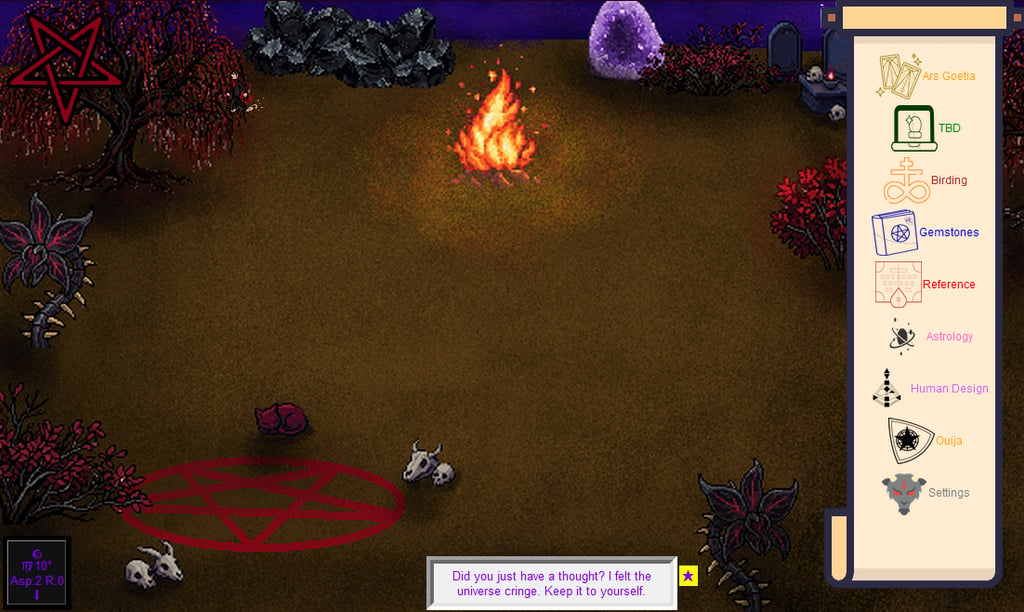
A little about each widget~
Stats (top left corner): These are timers. They are customizable in the settings. I needed personal reminders, and using this makes the dialog change. (when any stat hits 75, 50, 25% the dialog picks a new line). Some alternate uses for this could be for medication, plant watering, making offerings. Anything you may need a reminder/timer for. It's nice for things with odd timings, like every 5 days.
Dialog (center bottom): Dialog lines I made for myself. They are snarky, kinda flirty, or just annoying. It's just who I am as a person. The sprite is created in my image. It's me. I thought it brought everything together and feel more like how old websites felt back in the early 2000s. (I needed a nostalgia fix, sue me) The Star on the right of the dialog displays Traditional Demons and Nontraditional demons associated with the current day. It includes occult holidays. I tried to add as many holidays as I could, there just isn't a lot of them in general. The Dialog box will have a gold border if there is a holiday today.
Current Astrology(bottom left corner): Shows the current astrology, duh~ I added a journal feature. It will snapshot all of the current transits, and allow you to annotate whatever you want to track through astrology (yourself, current events, etc.)
Scroll Widgets:
Ars Goetia: A customizable tarot card with daemon information. (My UPG is what it currently is set with, milage may vary) The star on the top left will set the daemon that will open when you click the feature(default). The "View Image" is art by Chaweon Koo, her Spell Bound book is just as beautiful, consider buying it.
If you click the edit button, there is an option to add a new demon tarot card (Name and Sigil), that can be edited like the Goetia cards. Add the name and sigil, then you can select the name from the edit feature. There's far more entities than the Goetia so I wanted to make sure people can keep their notes full.
TBD: DONT WORRY ABOUT IT. I'm not sure if I am making a botany DB. The thought of the database size freaks me out so I may substitute this idea from plant ID to something else. It's currently a placeholder.
Birding: A local database that you can use to ID birds. It's flushed out for world-wide birds.
Gemstones: A local database that reminded me of 5th grade Science, where you can use certain characteristics of a stone to ID it. There's about 300 gemstones registered to it.
Reference: A PDF library and notes widget. Users can add books(pdfs) to it, and I included my small folder of PDFs and Book Covers. A lot of the daemonolotry suggested reading is included(all of the ones I could find at the time).
Astrology: A natal chart maker. Includes Western, Vedic, and Chinese Astrology. You can save the chart by naming the Profile. Location should be the closest City. (I included a list of cities world-wide, so hopefully it works for anyone anywhere.) Chinese and Vedic astrology have reference cards I made on Canva to help explain different parts as best as I could. (I am new to Chinese and Vedic, so trying to learn that while trying to learn programming was definitely a choice.)
Human Design: Creates a HD chart based on user input. It's great for filling in blanks for natal chart understanding. The body-graph is a little clunky, it was the best I could get it. On the bottom are more reference cards I made on Canva to help answer basic questions.
Ouija: A swipe keyboard with a dictionary of daemon-themed words. Neat little toy feature.
Settings: Changes font for the Dialog, Stats editing/creating, an Updater (if I update this), and a Donate button that provides ways to support me.
If you like my program, consider donating!
If you'd like a shortcut that you can customize the icon for,
>Right click Little Key.bat,
>more options at the bottom,
>create shortcut
>right click the Little_Key - Shortcut, click Properties
>click "Change Icon" to whatever you'd like, and place icon where you want it. (This is not file relocation, no installs need to be redone if this shortcut is moved)
Parts needed to download (all situated in install.bat, you wont need to worry about downloading anything here, its just a list of what is going to be downloaded on install):
Python 3.11 (this is the language the code is)
swisseph (this is for the astrology widgets)
pillow (this is for images)
requests
pymupdf (this is for PDFs)
matplotlib (creates visualizations, like HD bodygraph)
timezonefinder (keeps track of current time/date)
tzdata (time zone data)
PySide6 (helps with cross platforming Little Key for Mac/Linux, I have
not tested either as I don't have a way to.)
Contact
Questions? Reach out anytime brig@littlekey.io
© 2026. All rights reserved.